
RS232 communication in HEX format (datagram pattern)
Starts the test sequence and the device simulation as a pair.
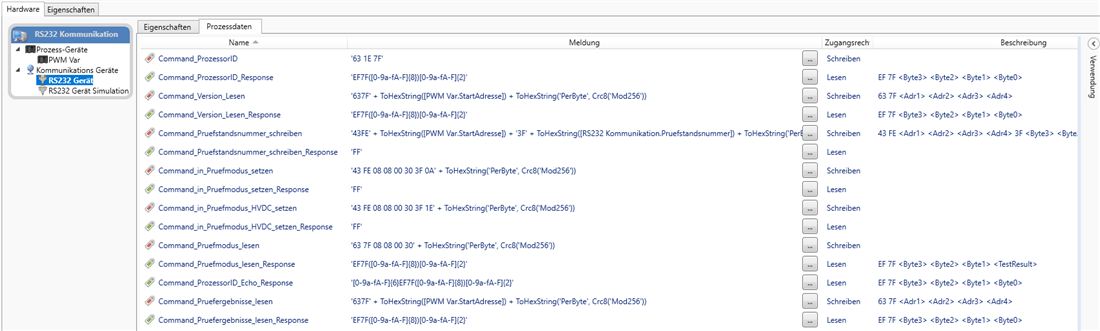
Demonstrates RS232 communication in HEX format following the datagram pattern, using a PWM control unit as an example. A test workflow reads the processor ID as well as bootloader, application and parameter version block by block (in four chunks each across memory addresses) and writes back a test stand number; the telegram evaluation is done through RegEx patterns with CRC8 checksum expressions. A second workflow simulates the device completely by responding to every command telegram with the matching answer — runnable with two emulated COM ports, entirely without a physical device.
Workflows in detail
-
Main
Starts the test sequence and the device simulation as a pair.
Start → call PWM Test → call PWM Simulation → end; error flow present.
-
PWM Test
Test side: reads version levels, writes the test stand number, reads the article number.
Start → handshake "Get ProcessorID" → per version: set start address → call "Read Version" → display → handshake "Write test stand number" → call "Read article number" → end.
-
PWM Simulation
Device simulation with response telegrams.
Start → trigger/response pairs for the processor ID, four chunks per version, test stand number ACK and article number → end.
-
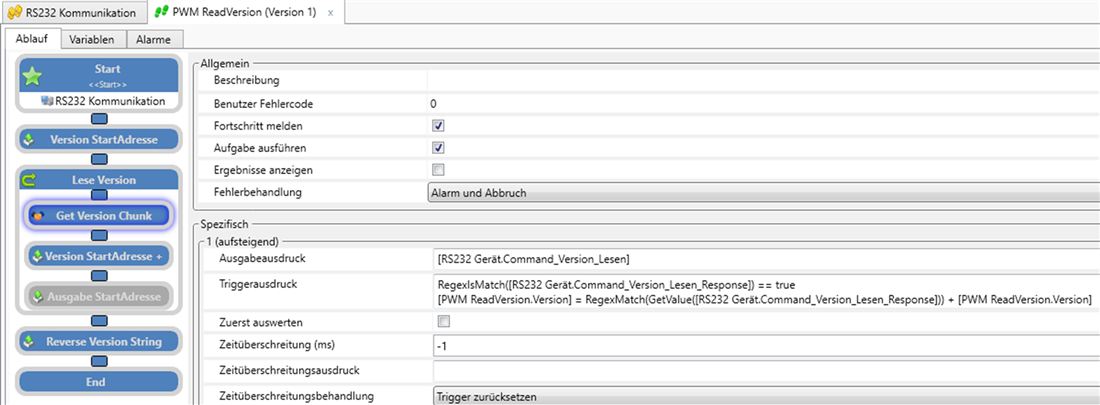
PWM ReadVersion
Reusable block for reading version strings block by block.
Start → set start address → loop (handshake "Get Version Chunk" → increment address) → reverse string → end.
Inside the software
Take it with you
Import through the SonicTC DbManager — individually or merged into an existing database.
Ready to experience acoustic test technology in your line?
Send us your part or schedule an online demo. First assessment within 24 hours.