
Line configuration with asynchronous fixtures
Starts idling and load test as asynchronously running sub-workflows.
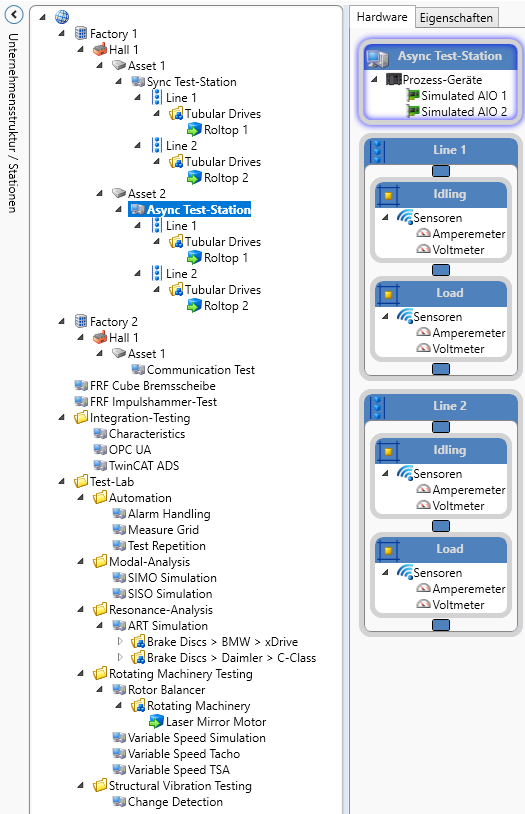
The counterpart to the synchronous line: the four fixtures (idling and load per line) run independently in their own loops — one test object passes through both fixtures of a line while the next one is already being processed in the other. The load test additionally increments the test object number on every run. Current and voltage signals are measured through a simulated analog I/O, with product selection through the product chooser.
Workflows in detail
-
Main 1 / Main 2
Starts idling and load test as asynchronously running sub-workflows.
Start → call IdlingTest → call LoadTest → end; error flow present.
-
IdlingTest (lines 1 and 2)
Measures current and voltage cyclically with an upstream wait time and product selection.
Start → idling loop (wait time → product chooser → ammeter measurement → voltmeter measurement → store) → end.
-
LoadTest (lines 1 and 2)
Measures cyclically and increments the test object number on every run.
Start → load loop (product chooser → test object number +1 → ammeter measurement → voltmeter measurement → store) → end.
Inside the software
Take it with you
Import through the SonicTC DbManager — individually or merged into an existing database.
Ready to experience acoustic test technology in your line?
Send us your part or schedule an online demo. First assessment within 24 hours.