
Test repetition & test sections
Runs the CW and CCW test sections in an endless loop and stores the results.
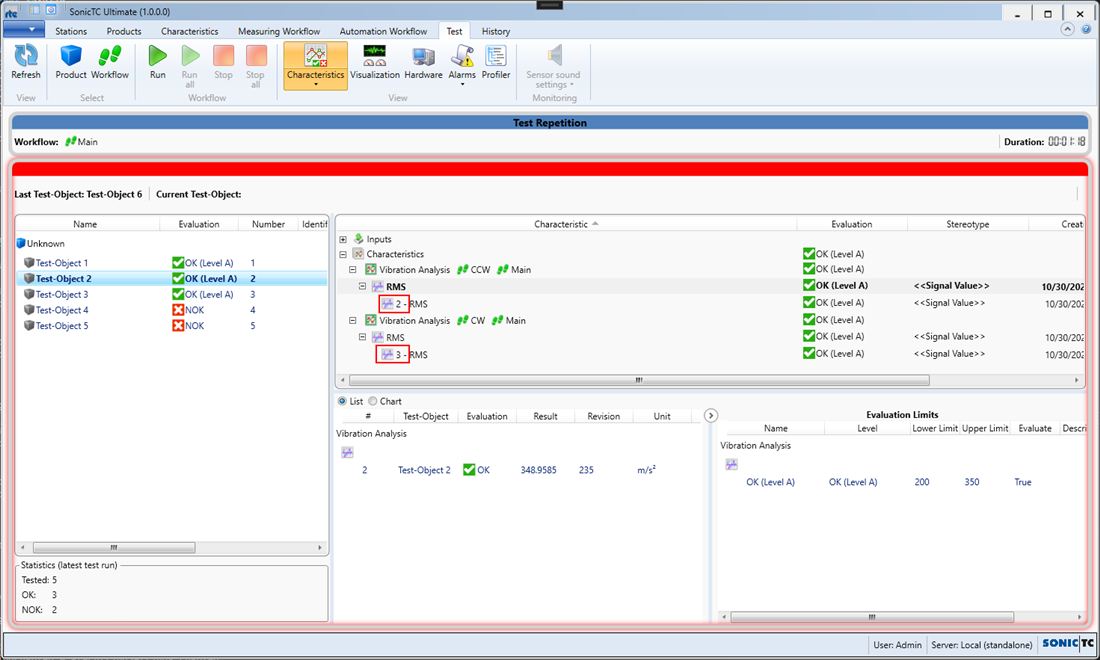
Demonstrates repeat measurements and test sections using a vibration test with two directions of rotation (CW/CCW). Two structurally identical test section workflows each measure the acceleration signal in a repeat loop and calculate the RMS value — repeated until evaluation == Good is reached, but no more than three times. The measurement signals of every repetition are stored, but only the last characteristic results; the number of repetitions can be shown in the characteristic result tree (permanently as well, through "Expand all characteristic result nodes"). Because both test sections call the same characteristic workflow, the option "Show call paths" is recommended. A control workflow synchronises the sections through ready/done signals; the error flows contain a reset trigger for a clean restart.
Workflows in detail
-
Main
Runs the CW and CCW test sections in an endless loop and stores the results.
Start → endless loop (call CW → call CCW → store) → call Control → end; error flow present.
-
CW / CCW
Test sections per direction of rotation with repeat measurements.
Start → repeat loop (start trigger → acceleration sensor measurement → vibration analysis → output "Done") → end; error flow with reset trigger.
-
Control
Synchronises the sections through ready/done handshakes and resets states.
Start → loop (init → timer → CW ready/done cycle → CCW ready/done cycle → reset) → end.
-
Vibration Analysis
Characteristic block.
Characteristic start → RMS → characteristic end.
Inside the software
Take it with you
Import through the SonicTC DbManager — individually or merged into an existing database.
Ready to experience acoustic test technology in your line?
Send us your part or schedule an online demo. First assessment within 24 hours.